
Is your Shark carpet cleaner leaving your carpets sopping wet? It’s a frustrating problem, but often fixable. This guide will walk you through the most common reasons why your Shark carpet cleaner isn’t picking up water, and provide step-by-step solutions to get it working like new again. We’ll cover everything from simple fixes like emptying the dirty water tank to more complex issues like checking for clogs and inspecting the vacuum motor.
A carpet cleaner that doesn’t pick up water defeats the whole purpose of cleaning. You want your carpets fresh, clean, and dry, not saturated and prone to mildew. Luckily, a few simple checks and maintenance steps can usually restore your Shark carpet cleaner’s suction power and get it back in top shape. Let’s dive in and troubleshoot!
1. Empty the Dirty Water Tank
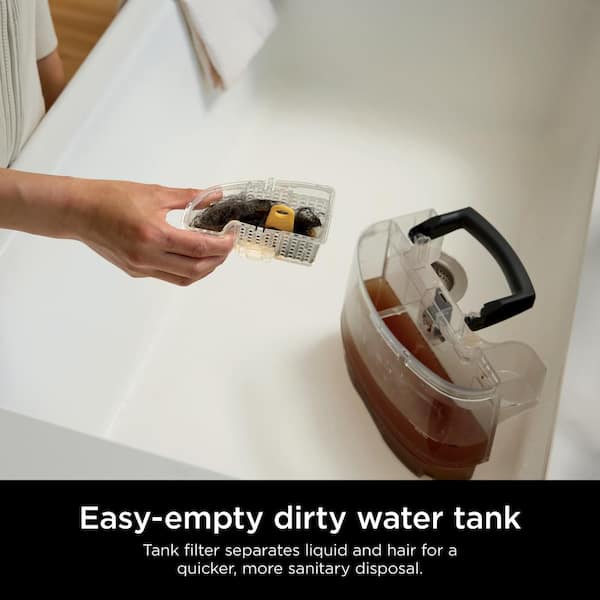
An obvious but often overlooked reason for poor water pick-up is a full dirty water tank. Your Shark carpet cleaner can’t effectively suction up more water if the tank is already at capacity.
- Solution: Stop cleaning immediately and empty the dirty water tank. Make sure it’s properly seated back in place after emptying. A sensor prevents operation if it is not placed correctly. Refer to your Shark carpet cleaner model’s manual for the exact location and removal instructions for the dirty water tank.
2. Check the Nozzle for Clogs
The nozzle is the part of the carpet cleaner that makes direct contact with the carpet and suctions up the dirty water. It’s prone to clogs from pet hair, carpet fibers, and dried cleaning solution.
- Tools Needed: Screwdriver (if required to remove the nozzle), flashlight, small brush or toothpick
- How to Check:
- Unplug the carpet cleaner.
- Refer to your manual for specific instructions on removing the nozzle. Some models require a screwdriver.
- Use a flashlight to inspect the nozzle opening for visible clogs.
- Use a small brush or toothpick to carefully remove any debris.
- Rinse the nozzle thoroughly with water.
- Reassemble the nozzle and test the carpet cleaner.
3. Inspect the Hose and Suction Path for Blockages
The hose and suction path are critical for transferring dirty water from the nozzle to the dirty water tank. Blockages here can significantly reduce suction.
- How to Check:
- Disconnect the hose from both the nozzle and the carpet cleaner body.
- Shine a flashlight through the hose to check for visible obstructions.
- Use a long, flexible object (like a straightened coat hanger or plumbing snake) to dislodge any clogs. Be gentle to avoid damaging the hose.
- Reconnect the hose securely and test the suction.
- Check the suction path within the carpet cleaner body itself. Refer to your model’s manual for access instructions.
4. Clean or Replace the Filters

Most Shark carpet cleaners have filters to protect the motor from dirt and debris. Clogged filters restrict airflow, reducing suction power.
- Types of Filters: Depending on your model, you may have one or more of the following:
- Pre-motor filter: Protects the motor from large particles.
- HEPA filter: Captures fine dust and allergens.
- How to Clean/Replace:
- Locate the filters. Refer to your owner’s manual for their location.
- Remove the filters.
- Wash washable filters with mild soap and water. Allow them to air dry completely before reinstalling.
- Replace disposable filters according to the manufacturer’s recommendations (usually every 3-6 months).
5. Check the Brush Roll and Belt
While the brush roll primarily agitates the carpet for cleaning, a tangled or obstructed brush roll can indirectly impact suction. A worn or broken belt can also affect the brush roll’s performance.
- How to Check:
- Unplug the carpet cleaner.
- Flip the unit over to access the brush roll.
- Remove any hair, threads, or debris wrapped around the brush roll. Scissors can be helpful for cutting tangled hair.
- Inspect the belt for signs of wear or breakage.
- Replace the belt if necessary. Refer to your manual for the correct replacement belt and installation instructions.
6. Verify Proper Assembly
Sometimes, the issue isn’t a malfunction, but simply incorrect assembly. Ensure all parts are properly connected and secured.
- Checklist:
- Is the handle securely attached?
- Are the tanks properly seated?
- Are all hoses and nozzles firmly connected?
- Are any latches or levers fully engaged?
- Solution: Disassemble and reassemble the carpet cleaner, carefully following the instructions in your owner’s manual. Pay close attention to any locking mechanisms or alignment marks.
7. Check the Vacuum Motor
If you’ve tried all the above steps and your Shark carpet cleaner still isn’t picking up water, the problem might be a faulty vacuum motor. This is a more serious issue that may require professional repair or replacement.
- Warning: Do not attempt to repair the vacuum motor yourself unless you have experience with electrical repairs.
- How to Check (Basic):
- Listen to the motor while the carpet cleaner is running. Does it sound weak, strained, or unusual?
- Check for any burning smells coming from the motor area.
- Solution: Contact Shark customer support or a qualified appliance repair technician for diagnosis and repair options.
FAQ Section
How often should I clean the filters on my Shark carpet cleaner?
Clean washable filters every 1-3 months, depending on usage. Replace disposable filters every 3-6 months, or as recommended by the manufacturer.
Why is my carpet cleaner leaving streaks on my carpet?
Streaking can be caused by a dirty nozzle, excessive cleaning solution, or uneven passes. Clean the nozzle thoroughly, use the recommended amount of cleaning solution, and overlap your cleaning passes slightly.
Can I use any cleaning solution in my Shark carpet cleaner?
No. Only use cleaning solutions specifically designed for carpet cleaners, and ideally those recommended by Shark. Other solutions may damage the machine or leave residue on your carpets.
How do I prevent clogs in my carpet cleaner?
Vacuum your carpets thoroughly before using the carpet cleaner. Regularly clean the nozzle, hose, and filters. Avoid using excessive amounts of cleaning solution.
My Shark carpet cleaner is making a loud noise. What could it be?
Loud noises can indicate a clog, a worn brush roll, or a problem with the motor. Check for obstructions first. If the noise persists, consult a repair technician.
Where can I find replacement parts for my Shark carpet cleaner?
Replacement parts can be purchased from the Shark website, authorized retailers, or online marketplaces like Amazon. Be sure to have your model number handy to ensure you order the correct parts.
Tips, Warnings, and Best Practices
- Always unplug the carpet cleaner before performing any maintenance or troubleshooting.
- Never submerge the carpet cleaner body in water.
- Use the correct amount of cleaning solution as specified in the owner’s manual. Overuse can leave residue and attract dirt.
- Allow carpets to dry completely after cleaning to prevent mildew growth.
- Regular maintenance is key to preventing problems and extending the life of your carpet cleaner.
- If you are unsure about any repair, contact a qualified technician.
Conclusion
A Shark carpet cleaner that doesn’t pick up water can be a real headache, but with a systematic approach, you can often diagnose and fix the problem yourself. By following this troubleshooting guide, checking for clogs, cleaning filters, and ensuring proper assembly, you can restore your carpet cleaner’s suction power and get your carpets looking their best. If all else fails, don’t hesitate to contact Shark customer support or a qualified repair professional. Getting your machine back in working order will help you maintain a clean and healthy home environment.





