
Do you find yourself struggling to keep your floors clean with a traditional vacuum? The Shark Rocket vacuum offers a lightweight and versatile solution for tackling dirt and dust throughout your home. This guide will walk you through everything you need to know about using your Shark Rocket vacuum effectively, from initial setup to tackling specific cleaning challenges.
The Shark Rocket vacuum is popular for its powerful suction and maneuverability, making it an excellent choice for both hard floors and carpets. Understanding its features and how to properly use them will ensure you get the most out of your cleaning routine. Whether you’re dealing with pet hair, crumbs, or everyday messes, mastering your Shark Rocket will make cleaning less of a chore.
This article will cover the essential steps for using your Shark Rocket vacuum, including assembly, operation, maintenance, and troubleshooting common issues. By the end, you’ll be equipped with the knowledge to keep your home spotless with ease.
Assembling Your Shark Rocket Vacuum

Proper assembly is crucial to ensuring your Shark Rocket vacuum operates efficiently and safely. Here’s how to put it together:
- Attaching the Wand: Insert the wand into the vacuum body until you hear a click. This connection provides extended reach for cleaning floors and ceilings.
- Connecting the Nozzle: Attach the desired cleaning nozzle to the wand or directly to the vacuum body. Common nozzles include the floor nozzle for carpets and hard floors and the dusting brush for furniture.
- Handle Installation: If your model includes a handle, slide it onto the top of the vacuum body until it locks into place. The handle provides a comfortable grip and better control during use.
- Cord Management: Ensure the power cord is properly secured to the vacuum body. This prevents tangling and keeps the cord out of your way while cleaning.
Getting Started: Basic Operation
Once assembled, understanding the basic operation of your Shark Rocket vacuum is key to efficient cleaning:
- Powering On: Plug the vacuum into a power outlet and press the power switch. Most models have multiple settings for different floor types.
- Floor Type Selection: Adjust the settings based on the surface you are cleaning. Use the “hard floor” setting for bare floors and the “carpet” setting for rugs and carpets.
- Maneuvering the Vacuum: Guide the vacuum across the floor in smooth, overlapping strokes. The lightweight design of the Shark Rocket makes it easy to maneuver around furniture and tight spaces.
- Using Attachments: Utilize the various attachments for specialized cleaning tasks. The crevice tool is perfect for reaching tight corners, while the upholstery tool works well on furniture and curtains.
Deep Cleaning Carpets
To effectively deep clean carpets with your Shark Rocket vacuum, follow these steps:
- Prepare the Area: Remove any small objects or debris from the carpet before vacuuming. This prevents damage to the vacuum and ensures a thorough clean.
- Adjust Settings: Set the vacuum to the “carpet” setting for optimal suction. This setting maximizes the vacuum’s ability to lift dirt and debris from carpet fibers.
- Overlapping Strokes: Use slow, overlapping strokes to cover the entire carpeted area. Focus on high-traffic areas and spots with visible dirt or stains.
- Empty the Dust Cup: Regularly empty the dust cup during the cleaning process to maintain suction power. A full dust cup can reduce the vacuum’s effectiveness.
- Brush Roll Maintenance: Periodically check the brush roll for tangled hair or debris. Remove any obstructions to ensure the brush roll spins freely and effectively agitates the carpet fibers.
Cleaning Hard Floors
Cleaning hard floors with the Shark Rocket vacuum requires a different approach to prevent scratching and ensure effective cleaning:
- Hard Floor Setting: Switch the vacuum to the “hard floor” setting. This setting reduces the brush roll speed and adjusts the suction to prevent damage to delicate surfaces.
- Specialized Nozzles: Use the hard floor attachment, which typically includes soft brush rollers or microfiber pads. These attachments gently clean the floor without scratching.
- Gentle Strokes: Guide the vacuum across the floor in gentle, overlapping strokes. Avoid applying too much pressure, which can damage the floor.
- Edge Cleaning: Use the edge cleaning feature, if available, to effectively clean along baseboards and in corners. This ensures a thorough clean throughout the room.
- Dust Cup Maintenance: Empty the dust cup regularly to maintain optimal suction. A clean dust cup ensures the vacuum can effectively pick up dust and debris from hard floors.
Using Attachments for Versatile Cleaning

The Shark Rocket vacuum comes with various attachments designed for specialized cleaning tasks:
- Crevice Tool: The crevice tool is ideal for reaching tight spaces, such as between cushions, along baseboards, and in corners. Attach it to the wand or directly to the vacuum body for targeted cleaning.
- Dusting Brush: The dusting brush is perfect for cleaning delicate surfaces like furniture, lampshades, and curtains. The soft bristles gently remove dust without scratching.
- Upholstery Tool: The upholstery tool is designed for cleaning furniture and upholstery. It effectively removes dirt, dust, and pet hair from fabric surfaces.
- Pet Power Brush: If your model includes a pet power brush, use it to remove stubborn pet hair from carpets, upholstery, and other surfaces. The motorized brush helps lift embedded hair and debris.
Maintaining Your Shark Rocket Vacuum
Regular maintenance is essential for keeping your Shark Rocket vacuum in optimal condition:
- Empty the Dust Cup: Empty the dust cup after each use to prevent loss of suction. A full dust cup reduces the vacuum’s effectiveness and can cause motor strain.
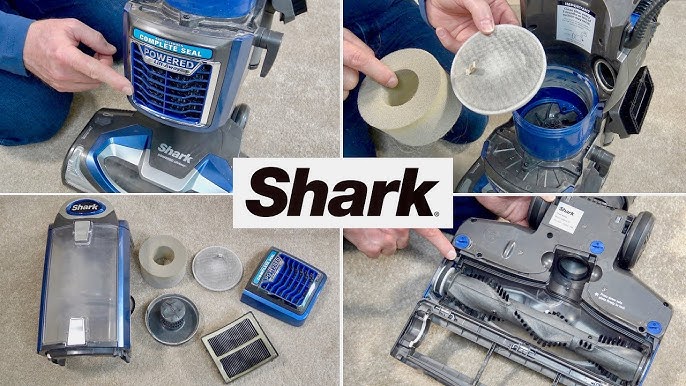
- Clean the Filters: Clean the filters regularly to maintain airflow and suction. Rinse the filters with water and allow them to dry completely before reassembling.
- Check the Brush Roll: Inspect the brush roll for tangled hair, threads, and debris. Remove any obstructions to ensure the brush roll spins freely and effectively cleans carpets and floors.
- Inspect the Hose: Check the hose for clogs or damage. Clear any blockages and replace the hose if it is cracked or damaged.
- Cord Care: Store the power cord properly to prevent tangling and damage. Avoid wrapping the cord too tightly around the vacuum, as this can cause fraying or breakage.
Troubleshooting Common Issues
Here are some common issues you might encounter with your Shark Rocket vacuum and how to resolve them:
- Loss of Suction:
- Problem: The vacuum has lost suction power.
- Solution: Check the dust cup and empty it if it’s full. Clean the filters and remove any blockages in the hose or attachments.
- Brush Roll Not Spinning:
- Problem: The brush roll is not spinning.
- Solution: Turn off the vacuum and unplug it. Remove any tangled hair or debris from the brush roll. Check the brush roll motor for damage.
- Vacuum Overheating:
- Problem: The vacuum is overheating.
- Solution: Turn off the vacuum and unplug it. Check for blockages in the hose, filters, or dust cup. Allow the vacuum to cool down before using it again.
- Unusual Noises:
- Problem: The vacuum is making unusual noises.
- Solution: Turn off the vacuum and unplug it. Check for loose parts or obstructions in the motor or brush roll. Contact customer service if the noise persists.
- Cord Issues:
- Problem: The power cord is damaged or frayed.
- Solution: Do not use the vacuum if the cord is damaged. Replace the cord or contact customer service for repair options.
Tips, Warnings, and Best Practices
- Read the Manual: Always read the manufacturer’s manual before using your Shark Rocket vacuum. This will provide specific instructions and safety guidelines for your model.
- Avoid Water: Never use the vacuum to clean up water or other liquids. This can damage the motor and create an electrical hazard.
- Proper Storage: Store the vacuum in a dry, safe place when not in use. Avoid storing it in direct sunlight or extreme temperatures.
- Regular Cleaning: Clean your vacuum regularly to maintain its performance and extend its lifespan. This includes emptying the dust cup, cleaning the filters, and checking the brush roll.
- Professional Service: If you encounter any major issues or are unsure how to perform a repair, contact a professional service technician.
FAQ Section
How often should I empty the dust cup on my Shark Rocket vacuum?
Empty the dust cup after each use or when it appears full. A full dust cup reduces suction power and can affect cleaning performance. Regular emptying ensures your vacuum operates efficiently.
How do I clean the filters on my Shark Rocket vacuum?
Remove the filters and rinse them with water. Allow them to air dry completely before reassembling. Check your vacuum’s manual for specific instructions, as some models have different filter types that require unique cleaning methods.
Can I use my Shark Rocket vacuum on hardwood floors?
Yes, the Shark Rocket vacuum can be used on hardwood floors. Make sure to switch to the “hard floor” setting and use the appropriate attachment to prevent scratching. Gentle strokes are recommended to protect the floor’s surface.
What should I do if my Shark Rocket vacuum loses suction?
First, check and empty the dust cup. Then, inspect the filters and clean them if necessary. Also, check the hose and attachments for any blockages. If the problem persists, consult the troubleshooting section in your vacuum’s manual.
How do I remove tangled hair from the brush roll?
Turn off and unplug the vacuum. Use scissors or a seam ripper to carefully cut away the tangled hair and debris from the brush roll. Ensure the brush roll spins freely after cleaning.
Is it safe to use my Shark Rocket vacuum on delicate upholstery?
Yes, but use the upholstery tool attachment and test a small, inconspicuous area first. This ensures the vacuum doesn’t damage the fabric. Use gentle strokes and avoid excessive pressure.
Conclusion
Mastering the use of your Shark Rocket vacuum involves proper assembly, understanding its features, and performing regular maintenance. By following the steps outlined in this guide, you can ensure your home remains clean and dust-free with minimal effort.
From deep cleaning carpets to tackling hard floors and using specialized attachments, the Shark Rocket is a versatile tool for any home. Remember to maintain your vacuum regularly and address any issues promptly to keep it running smoothly. Take the next step towards a cleaner home and confidently use your Shark Rocket vacuum to its full potential.


