
Is your Shark vacuum cleaner making all the right noises, with strong suction coming from the hose, but the brush roll refuses to spin? This can be frustrating, rendering your vacuum less effective on carpets and rugs. Don’t rush to replace your vacuum just yet! In this guide, we’ll explore common reasons why your Shark vacuum might be experiencing this issue and provide step-by-step troubleshooting tips to get your brush roll spinning again.
This problem matters because a non-functioning brush roll significantly reduces your vacuum’s ability to agitate and lift dirt, debris, and pet hair embedded in carpets and rugs. You’ll end up spending more time and effort cleaning, with less-than-satisfactory results. Fortunately, with a bit of investigation and some simple fixes, you can often restore your Shark vacuum to its full cleaning potential. This guide will provide you with the knowledge and tools to diagnose the issue, perform basic maintenance, and potentially save yourself the cost of a repair or replacement.
We’ll cover everything from checking for blockages and tangled hair to inspecting the belt and motor. Whether you have an upright, stick, or cordless Shark vacuum, these tips will help you identify the cause of the problem and get your brush roll spinning smoothly again. Let’s dive in and get your Shark vacuum back in top shape!
Check for Blockages in the Hose and Nozzle
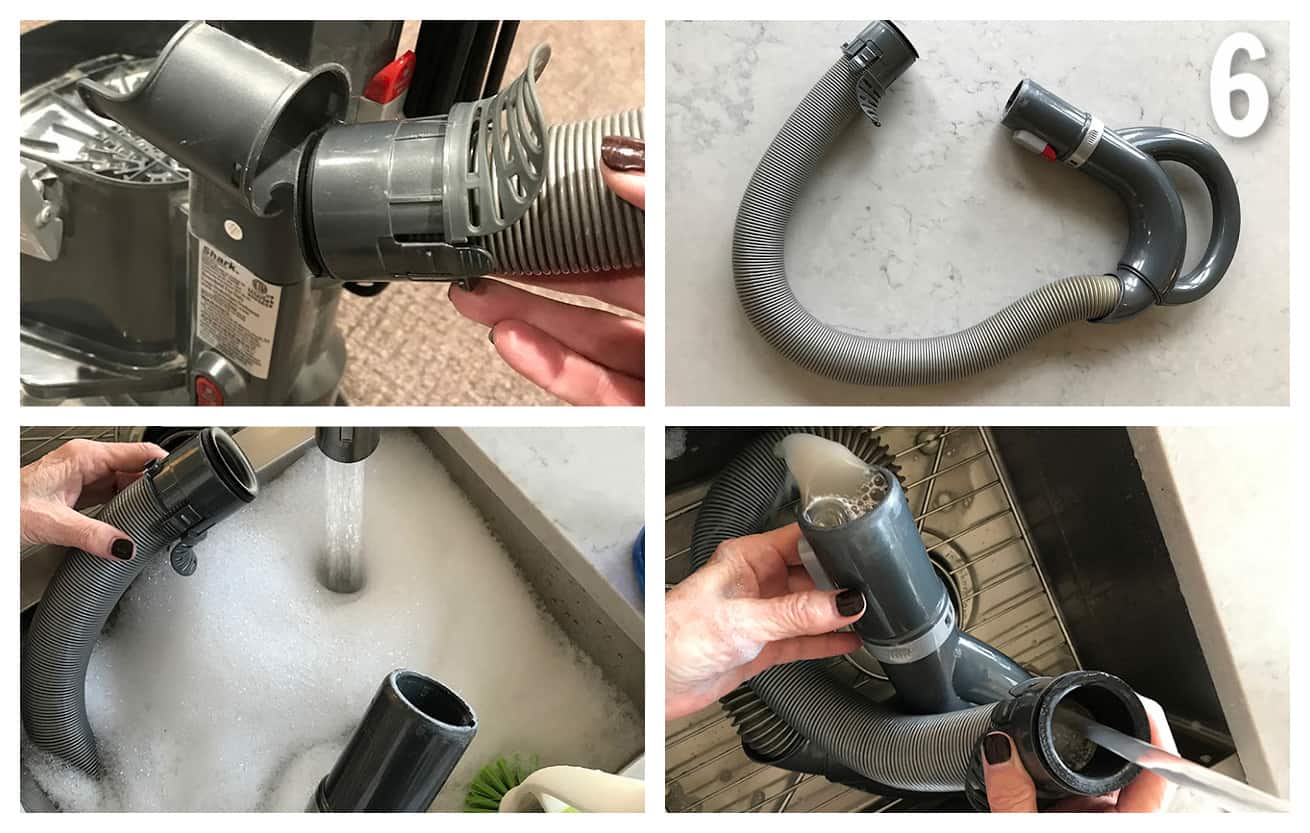
One of the most common reasons for a Shark vacuum to suction from the hose but not the brush is a blockage. Over time, hair, dirt, and debris can accumulate in the hose, wand, or nozzle, restricting airflow to the brush roll.
- Disconnect the Hose: Detach the hose from the vacuum body and the floor nozzle.
- Inspect the Hose: Look through the hose to check for any visible obstructions. Use a broom handle or similar tool to gently dislodge any blockages.
- Check the Wand: If your vacuum has a wand, detach it and inspect it for blockages as well.
- Examine the Nozzle: Remove the floor nozzle from the vacuum and check for clogs around the brush roll and air pathways.
- Reassemble and Test: Once you’ve cleared any blockages, reassemble the vacuum and test if the brush roll is now spinning.
Clean the Brush Roll
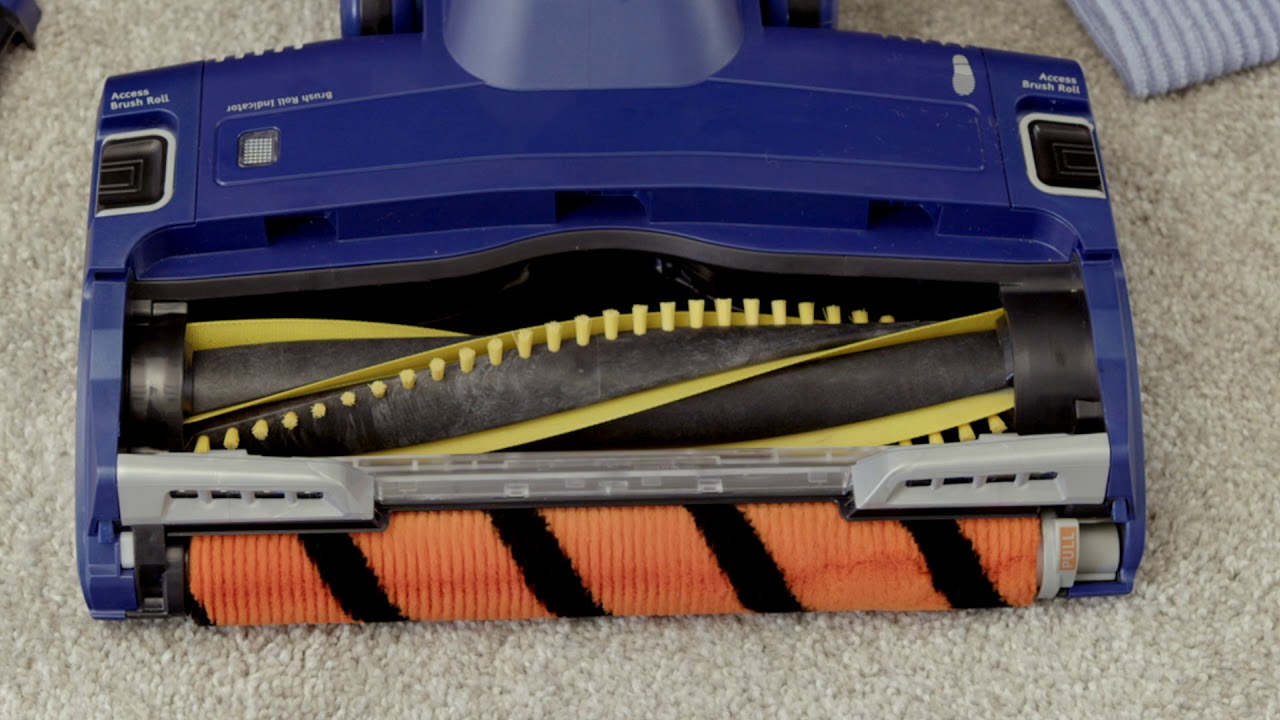
Tangled hair, threads, and fibers can easily wrap around the brush roll, preventing it from spinning freely. Regular cleaning is essential to maintain optimal performance.
- Turn Off and Unplug: Always turn off and unplug your Shark vacuum before performing any maintenance.
- Remove the Brush Roll: Depending on your model, you may need to use a screwdriver or coin to unlock the brush roll access panel.
- Remove Debris: Carefully remove any hair, threads, or fibers wrapped around the brush roll. Scissors or a seam ripper can be helpful for cutting through tangled messes.
- Clean the Brush Roll Housing: Remove any debris from the brush roll housing and check for any obstructions.
- Reinstall the Brush Roll: Reinstall the brush roll, making sure it is securely in place.
- Test the Vacuum: Plug in and turn on the vacuum to see if the brush roll is now spinning.
Inspect the Brush Roll Belt

Many Shark vacuums use a belt to connect the motor to the brush roll. If the belt is broken, stretched, or worn, it may not be able to turn the brush roll effectively.
- Access the Brush Roll: As described in the previous section, access the brush roll and remove it.
- Inspect the Belt: Examine the belt for any signs of damage, such as cracks, tears, or excessive wear.
- Check Belt Tension: The belt should be snug but not too tight. If it’s loose, it may need to be replaced.
- Replace the Belt: If the belt is damaged or worn, replace it with a new belt that is specifically designed for your Shark vacuum model.
- Reassemble and Test: Reinstall the brush roll and belt, then test the vacuum to see if the brush roll is now working.
Check the Brush Roll Motor
In some cases, the brush roll motor itself may be faulty. This is less common but still a possibility.
- Listen for Motor Noise: When you turn on the vacuum, listen closely for any unusual noises coming from the brush roll motor. A grinding or squealing sound could indicate a problem.
- Check for Overheating: If the motor feels excessively hot to the touch, it may be overheating and shutting down.
- Consult a Professional: If you suspect a motor problem, it’s best to consult a qualified appliance repair technician. Replacing the motor can be a complex task, and it’s often more cost-effective to have it done professionally.
Reset the Motor

Some Shark vacuums have a motor reset button that can help resolve brush roll issues.
- Locate the Reset Button: Refer to your vacuum’s owner’s manual to find the location of the motor reset button. It’s typically located on the vacuum body or near the brush roll housing.
- Unplug the Vacuum: Unplug the vacuum from the power outlet.
- Press and Hold: Press and hold the reset button for 3-5 seconds.
- Plug in and Test: Plug the vacuum back into the power outlet and turn it on to see if the brush roll is now functioning.
Troubleshooting Guide
| Problem | Possible Cause(s) | Solution(s) |
|---|---|---|
| Brush roll not spinning | Blockage in hose, wand, or nozzle | Disconnect and inspect each component, removing any obstructions. |
| Brush roll not spinning | Tangled hair or debris around brush roll | Remove the brush roll and carefully clean away any tangled hair, threads, or fibers. |
| Brush roll not spinning | Broken, stretched, or worn brush roll belt | Inspect the belt for damage and replace if necessary. |
| Brush roll not spinning | Faulty brush roll motor | Listen for unusual motor noises or overheating. Consult a professional for repair or replacement. |
| Brush roll stops spinning intermittently | Overheating or overload protection | Check for blockages or tangled debris. Allow the vacuum to cool down before restarting. |
Tips, Warnings, and Best Practices
- Regular Maintenance: Regularly clean the brush roll and empty the dust cup to prevent blockages and maintain optimal performance.
- Avoid Overloading: Avoid vacuuming excessively large or heavy debris that could strain the motor or clog the system.
- Check Filters: Clean or replace the filters regularly to maintain good suction and airflow.
- Use the Right Settings: Use the appropriate suction and brush roll settings for different floor types.
- Professional Servicing: If you’re unable to resolve the issue yourself, consider taking your vacuum to a qualified repair technician.
FAQ Section
What does it mean when my Shark vacuum has suction but the brush isn’t spinning?
When your Shark vacuum has suction from the hose, but the brush isn’t spinning, it typically indicates a problem with the brush roll mechanism. This could be due to a blockage, tangled debris, a faulty belt, or a motor issue. It means that while the vacuum is still capable of generating suction to pick up loose dirt, it can’t effectively agitate and lift debris embedded in carpets and rugs due to the non-rotating brush.
How do I know if my Shark vacuum brush roll motor is bad?
Signs of a bad brush roll motor include unusual noises (grinding, squealing), overheating, or the brush roll failing to spin even after cleaning and removing obstructions. A burning smell may also indicate a motor problem. If the motor is unresponsive or exhibiting these symptoms, it likely needs to be replaced.
Can I replace the brush roll belt on my Shark vacuum myself?
Yes, in many cases, you can replace the brush roll belt on your Shark vacuum yourself. Shark vacuums are designed for easy maintenance and replacement of simple parts like the belt. You’ll need to purchase the correct replacement belt for your specific model and follow the instructions in your owner’s manual or online tutorials.
Why does my Shark vacuum brush roll stop spinning on carpet?
A Shark vacuum brush roll might stop spinning on the carpet due to excessive resistance, tangled debris, or the vacuum’s safety mechanisms kicking in. Carpets can create more friction, and if the brush roll is already struggling with tangled hair or a weak belt, it may stop spinning to prevent damage to the motor. Check for blockages and ensure the brush roll is clean and the belt is in good condition.
How often should I clean my Shark vacuum brush roll?
You should clean your Shark vacuum brush roll regularly, ideally after each use or at least once a month, depending on how frequently you vacuum and the types of surfaces you clean. Regular cleaning prevents the accumulation of hair, threads, and debris, which can reduce the brush roll’s effectiveness and potentially damage the motor.
What type of maintenance is required for a Shark vacuum to maintain suction?
To maintain suction in your Shark vacuum, regularly empty the dust cup, clean or replace the filters, check for and clear any blockages in the hose, wand, and nozzle, and clean the brush roll. These maintenance steps ensure that the vacuum can efficiently draw air and maintain strong suction power.
Conclusion
A Shark vacuum that suctions from the hose but not the brush can be a frustrating problem, but it’s often easily resolved with a few simple troubleshooting steps. By checking for blockages, cleaning the brush roll, inspecting the belt, and considering motor issues, you can often restore your vacuum to its full cleaning potential. Remember to perform regular maintenance to prevent future problems and keep your Shark vacuum running smoothly for years to come. With a little effort, you can keep your Shark vacuum performing at its best and enjoy a cleaner, healthier home. If all else fails, consult a professional repair service to diagnose and fix the problem.





