
Is your Shark Navigator NV370 vacuum cleaner’s brush roll refusing to spin? This is a common issue that many users face, and it can be frustrating when you’re trying to keep your floors clean. A non-spinning brush roll significantly reduces the vacuum’s ability to pick up dirt, debris, and pet hair effectively. This guide will walk you through the most common causes and step-by-step solutions to get your Shark NV370 brush roll spinning again.
This guide will help you diagnose and fix the problem, saving you time and potentially the cost of a repair or replacement. We’ll cover everything from simple fixes like clearing blockages to more complex solutions, ensuring you can confidently tackle the issue. Let’s get your Shark Navigator NV370 back in action.
Common Causes and Simple Solutions

Several reasons could be behind your Shark NV370’s brush not turning on. Before diving into more complex solutions, let’s start with the basics. A common cause is a simple blockage or obstruction preventing the brush roll from spinning freely. Over time, hair, threads, and other debris can wrap around the brush roll, creating resistance and eventually stopping it altogether. Additionally, make sure the vacuum is properly assembled, as a loose connection can interrupt power to the brush roll motor.
Step 1: Check the Power Switch and Settings
- Ensure the vacuum is plugged in: Sounds obvious, but double-check!
- Verify the power switch is on: Make sure the vacuum is powered on.
- Check the brush roll setting: The Shark NV370 has settings for different floor types. Ensure the brush roll is activated for your floor type (usually a switch or button).
- Hard Floor Setting: If you’re on a hard floor, make sure the brush roll is designed to spin on that surface. Some models have a separate hard floor setting where the brush roll might be disengaged to protect delicate surfaces.
Step 2: Unplug and Inspect the Brush Roll
Safety First: Always unplug your vacuum cleaner before performing any maintenance or troubleshooting.
- Remove the Brush Roll Cover: Locate the brush roll cover, usually held in place by screws or clips. Remove it to access the brush roll.
- Visually Inspect the Brush Roll: Look for any visible obstructions like hair, string, or debris wrapped around the brush roll.
- Manually Rotate the Brush Roll: Try turning the brush roll by hand. If it feels stiff or doesn’t move freely, it’s likely blocked.
Step 3: Clear Any Obstructions
- Remove Hair and Debris: Use scissors or a seam ripper to carefully cut away any tangled hair, string, or debris from the brush roll. Be careful not to damage the bristles.
- Check the Brush Roll Housing: Inspect the area around the brush roll for any trapped debris. Use a small brush or crevice tool to remove anything lodged in the housing.
- Reinstall the Brush Roll Cover: Once you’ve cleared all obstructions, reinstall the brush roll cover securely.
Deep Dive: More Complex Issues and Solutions
If the simple solutions didn’t work, the problem might be a bit more involved. Let’s explore some deeper troubleshooting steps.
Step 4: Check the Hose and Airway for Blockages
A clogged hose or airway can restrict airflow, causing the vacuum to overheat and the brush roll to stop working.
- Detach the Hose: Disconnect the hose from the vacuum body and the floor nozzle.
- Inspect for Blockages: Look through the hose for any visible obstructions.
- Clear the Hose: Use a broom handle or similar tool to gently push any blockages through the hose.
- Check the Airway: Inspect the airway between the hose and the dust cup for any clogs.
- Reassemble: Reattach the hose and ensure all connections are secure.
Step 5: Inspect the Belt (If Applicable)
Some Shark NV370 models use a belt to drive the brush roll. If the belt is broken or stretched, the brush roll won’t turn.
- Locate the Belt: The belt is usually located under the brush roll cover.
- Inspect the Belt: Check the belt for any signs of damage, such as cracks, breaks, or excessive stretching.
- Replace the Belt: If the belt is damaged, replace it with a new one according to the manufacturer’s instructions.
Step 6: Reset the Motor
Some Shark vacuums have a thermal overload switch that can shut off the motor if it overheats. Resetting the motor can sometimes resolve the issue.
- Unplug the Vacuum: Disconnect the vacuum from the power outlet.
- Let it Cool Down: Allow the vacuum to cool down for at least 30 minutes.
- Press the Reset Button (If Applicable): Some models have a reset button on the motor housing. Press it to reset the motor.
- Plug it Back In: Plug the vacuum back into the power outlet and try turning it on.
Practical Tips for Maintaining Your Shark NV370
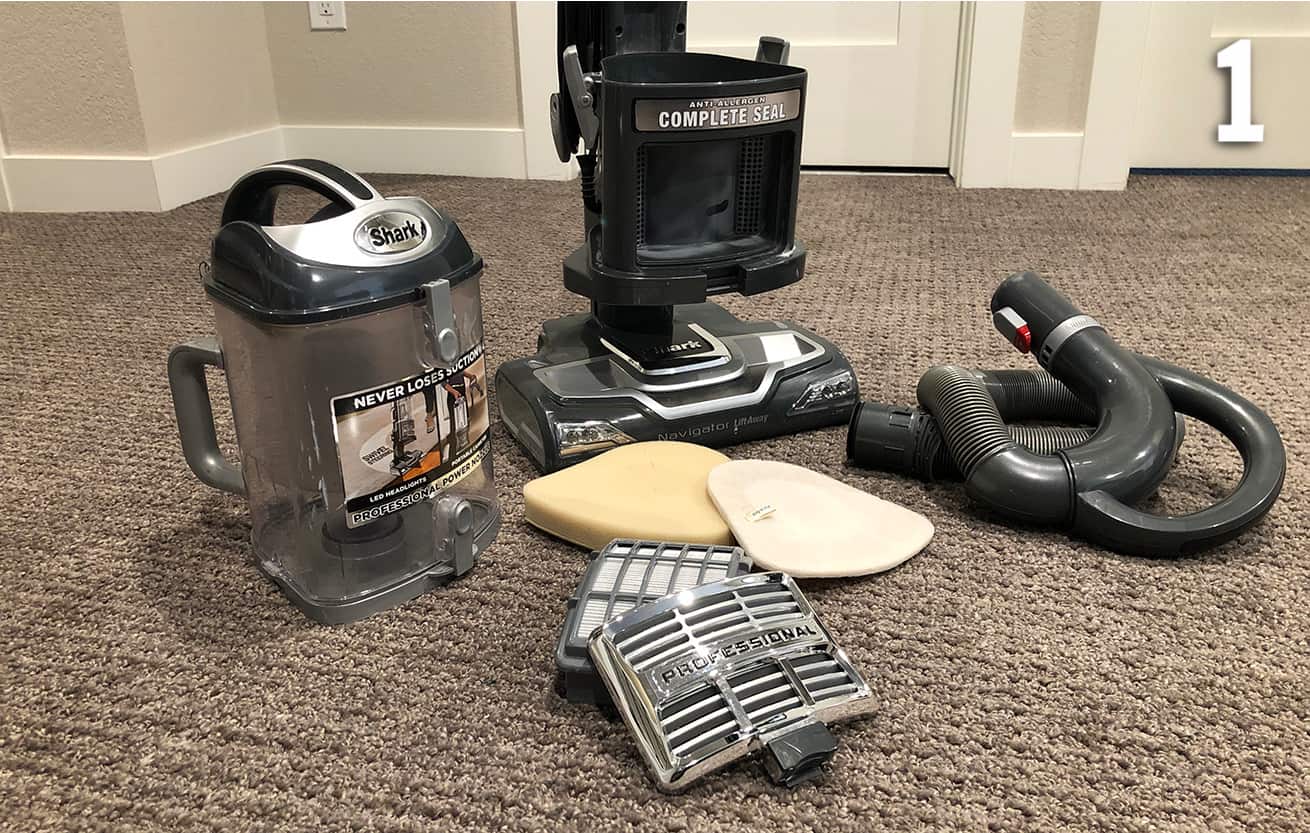
- Regular Cleaning: Clean the brush roll and filters regularly to prevent clogs and maintain optimal performance.
- Empty the Dust Cup: Empty the dust cup after each use to prevent airflow restrictions.
- Check for Blockages: Periodically inspect the hose and airways for any obstructions.
- Replace Filters: Replace the filters according to the manufacturer’s recommendations (usually every 3-6 months).
- Avoid Overloading: Don’t try to vacuum up large or heavy objects that could damage the vacuum.
Troubleshooting Guide
| Problem | Possible Cause(s) | Solution(s) |
|---|---|---|
| Brush roll not turning on | Blocked brush roll, incorrect settings, clogged hose, broken belt, motor overheat | Clear brush roll, check settings, clear hose, replace belt, let motor cool down, reset motor |
| Vacuum loses suction | Full dust cup, clogged filter, blocked hose | Empty dust cup, clean/replace filter, clear hose |
| Vacuum overheating | Blocked hose, clogged filter, full dust cup | Clear hose, clean/replace filter, empty dust cup |
| Brush roll turns on but then stops shortly after. | motor overheat, or overload | Turn off the vacuum and let the motor cool down for at least 30 minutes before turning back on. |
FAQ Section
Why is my Shark vacuum brush roll not spinning, even after cleaning it?
Even after cleaning, the brush roll might not spin if there’s a blockage deeper in the hose or if the belt is damaged. Also, a faulty motor can prevent the brush roll from spinning, even when it’s clean. Be sure to inspect these areas thoroughly, and if the issue persists, consider consulting a professional repair service.
How do I know if my Shark vacuum belt is broken?
If your Shark vacuum belt is broken, you might notice a burning rubber smell, or the brush roll will stop spinning altogether. To check, unplug the vacuum, remove the brush roll cover, and inspect the belt for any visible damage, such as cracks, breaks, or excessive stretching. If the belt is damaged, it will need to be replaced.
Can I use my Shark NV370 on hardwood floors without damaging them?
Yes, the Shark NV370 is designed to be used on hardwood floors. Ensure you use the appropriate setting for hard floors, which may disengage the brush roll to prevent scratching. Always test the vacuum in an inconspicuous area first to ensure it doesn’t damage the finish.
How often should I replace the filters in my Shark NV370 vacuum?
The filters in your Shark NV370 should be cleaned regularly and replaced every 3-6 months, depending on usage. Regular filter replacement ensures optimal suction and prevents damage to the motor. Check the manufacturer’s instructions for specific recommendations.
What does it mean if my Shark vacuum is making a loud noise?
A loud noise from your Shark vacuum can indicate several issues, such as a blockage in the hose, a damaged brush roll, or a problem with the motor. Check for any visible obstructions and inspect the brush roll for damage. If the noise persists, the motor may need professional servicing.
My Shark vacuum brush roll is clogged with hair. What’s the best way to remove it?
The best way to remove hair from your Shark vacuum brush roll is to use scissors or a seam ripper to carefully cut away the tangled hair. Be gentle to avoid damaging the bristles. Regular cleaning of the brush roll will prevent excessive buildup and maintain optimal performance.
Tips, Warnings, and Best Practices
- Safety First: Always unplug your vacuum before performing any maintenance or troubleshooting.
- Avoid Water: Never submerge the vacuum or its parts in water.
- Read the Manual: Refer to your Shark NV370 user manual for specific instructions and safety guidelines.
- Professional Help: If you’re uncomfortable performing any of these steps, consult a qualified appliance repair technician.
- Regular Maintenance: Regular maintenance is key to keeping your Shark NV370 running smoothly and preventing future issues.
Conclusion
A non-spinning brush roll on your Shark Navigator NV370 can be a frustrating problem, but with the right troubleshooting steps, you can often resolve the issue yourself. By following this guide, you can diagnose the cause of the problem, perform the necessary repairs, and get your vacuum back in action. Remember to prioritize safety and consult the user manual for specific instructions. With regular maintenance, your Shark NV370 will continue to provide effective cleaning for years to come. If all else fails, consider contacting Shark customer support or a qualified repair technician for assistance.





