

Is your Shark Apex vacuum cleaner failing to pick up dirt and debris like it used to? A loss of suction can be frustrating, but it’s often a problem you can diagnose and fix yourself. This guide will walk you through common causes and provide step-by-step solutions to restore your Shark Apex’s powerful suction.
A Shark Apex vacuum cleaner is a great investment for keeping your home clean. However, if you notice that your Shark Apex vacuum is not suctioning properly, it can be a frustrating experience. Identifying the root cause is the first step toward resolving this issue and restoring your vacuum to its optimal performance. We will help you troubleshoot your vacuum and give you some tips to get the suction back in your Shark Apex.
This article will provide you with a detailed guide to fix the suction problem in your Shark Apex. We’ll cover everything from checking for blockages and cleaning filters to inspecting the hose and brush roll. By following these tips, you can troubleshoot the issue yourself and get your Shark Apex vacuum working like new again.
Check the Dust Cup and Empty It
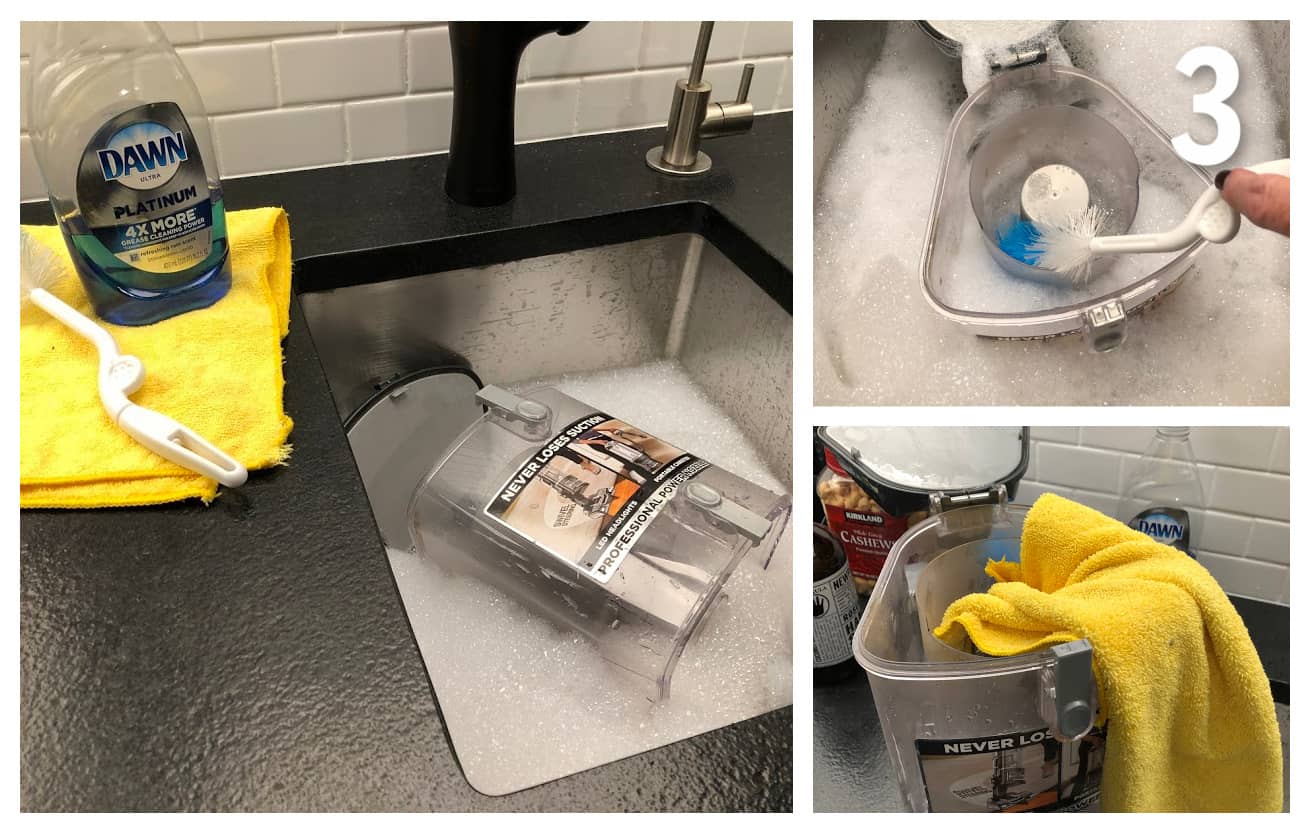
A full dust cup is one of the most common reasons for a loss of suction in any vacuum cleaner, including the Shark Apex. When the dust cup is full, it restricts airflow and prevents the vacuum from effectively picking up dirt and debris.
How to resolve:
- Detach the dust cup: Remove the dust cup from the vacuum body.
- Empty the contents: Dispose of all the dirt, dust, and debris inside the cup.
- Clean the dust cup: Rinse the dust cup with water and allow it to dry completely before reattaching it to the vacuum.
Clean the Filters
Dirty filters can significantly reduce suction power. The Shark Apex has multiple filters that need regular cleaning to maintain optimal performance.
How to resolve:
- Locate the filters: Typically, there are pre-motor filters (foam and felt) located beneath the dust cup and a post-motor HEPA filter, usually found on the front or top of the vacuum.
- Remove the filters: Take out each filter according to the instructions in your Shark Apex user manual.
- Clean the filters:
- Foam and Felt Filters: Hand wash them with mild soap and warm water. Rinse thoroughly until the water runs clear.
- HEPA Filter: Gently tap the HEPA filter over a trash can to remove loose dust and debris. You can also rinse it gently if heavily soiled, but ensure it’s completely dry before reinstalling.
- Dry the filters: Allow all filters to air dry completely for at least 24 hours before placing them back in the vacuum.
- Reinstall the filters: Put the dry filters back into their respective positions in the vacuum.
Inspect the Hose and Attachments for Blockages
Blockages in the hose, wand, or attachments can severely limit suction. Regularly checking these components is essential.
How to resolve:
- Detach the hose and attachments: Remove the hose from both the vacuum body and the floor nozzle. Disconnect any attachments you are using.
- Inspect for blockages: Look through each part for any visible obstructions like hair, dirt clumps, or larger objects.
- Remove blockages:
- Use a long, flexible tool such as a broom handle or a bent wire hanger to dislodge any blockages in the hose and wand.
- For attachments, manually remove any tangled hair or debris.
- Reassemble and test: Reconnect all the parts and test the vacuum’s suction power.
Check the Brush Roll and Clean Away Debris

The brush roll is crucial for agitating and lifting dirt from carpets and floors. A tangled or jammed brush roll can significantly reduce suction.
How to resolve:
- Turn off and unplug the vacuum: Ensure the vacuum is turned off and unplugged before inspecting the brush roll for safety.
- Access the brush roll: Depending on your Shark Apex model, you may need to use a screwdriver or coin to open the brush roll access panel.
- Remove the brush roll: Take out the brush roll from its housing.
- Clean the brush roll:
- Remove any tangled hair, threads, or debris wrapped around the brush roll. Scissors or a seam ripper can be helpful for cutting through tangled hair.
- Wipe the brush roll clean with a dry cloth to remove any remaining dirt.
- Reinstall the brush roll: Place the cleaned brush roll back into its housing and secure it.
- Test the vacuum: Turn on the vacuum and check if the brush roll spins freely.
Check for Air Leaks

Air leaks can diminish suction power. Check all connections and seals for damage or improper fit.
How to resolve:
- Inspect all connections: Ensure that the hose, wand, dust cup, and other attachments are securely connected to the vacuum body.
- Check for cracks or damage: Look for any visible cracks, holes, or damage on the hose, dust cup, and other plastic components.
- Seal any leaks:
- If you find any small cracks or holes, you can temporarily seal them with duct tape. However, for a long-term solution, it’s best to replace the damaged part.
- Test the suction: After sealing any potential leaks, turn on the vacuum and check if the suction has improved.
Reset the Vacuum
Some Shark Apex models have a reset function that can help resolve suction issues.
How to resolve:
- Unplug the vacuum: Disconnect the vacuum from the power outlet.
- Wait: Let the vacuum sit unplugged for about 30 minutes to allow the motor to cool down.
- Plug it back in: Reconnect the vacuum to the power outlet.
- Test the vacuum: Turn on the vacuum and check if the suction has been restored.
Check the Settings and Modes
Sometimes, the issue isn’t a malfunction but an incorrect setting.
How to resolve:
- Verify the floor setting: Ensure that the vacuum is set to the correct floor type (carpet or hard floor).
- Check the suction control: Some models have a suction control feature. Make sure it is set to the appropriate level for the cleaning task.
- Test different modes: If your vacuum has multiple cleaning modes (e.g., deep clean, gentle clean), try switching between them to see if suction improves.
Troubleshooting Guide
| Problem | Possible Cause | Solution |
|---|---|---|
| Weak or no suction | Full dust cup | Empty the dust cup |
| Clogged filters | Clean or replace the filters | |
| Blocked hose or attachments | Inspect and clear any blockages | |
| Tangled brush roll | Clean the brush roll | |
| Air leaks | Check and seal any leaks | |
| Vacuum shuts off frequently | Overheating | Unplug the vacuum and let it cool down for 30 minutes |
| Blocked hose or filters | Check and clear any blockages, clean or replace filters | |
| Unusual noises | Blocked hose or brush roll | Inspect and clear any blockages |
| Damaged brush roll or motor | Replace the brush roll or consult a professional repair service | |
| Poor performance on carpets | Incorrect height setting | Adjust the height setting according to the carpet type |
| Clogged brush roll | Clean the brush roll | |
| Suction good on hose only | Problem with floor nozzle or brush roll | Check and clean the floor nozzle and brush roll, ensure they are properly connected |
| Blockage in the lower part of the vacuum body | Disassemble the floor nozzle and check for blockages |
Pro Tips
- Regular Maintenance: Make it a habit to empty the dust cup after each use and clean the filters monthly to prevent suction loss.
- Gentle Cleaning: When cleaning filters, use gentle soap and avoid harsh chemicals that can damage the filter material.
- Brush Roll Care: Regularly check and clean the brush roll to prevent tangles and maintain optimal performance.
- Proper Storage: Store your Shark Apex in a clean, dry place to prevent dust and moisture buildup.
Tips, Warnings, and Best Practices
- Safety First: Always turn off and unplug the vacuum cleaner before performing any maintenance or troubleshooting steps.
- Filter Drying: Ensure that the filters are completely dry before reinstalling them to prevent motor damage and mold growth.
- Avoid Overfilling: Do not overfill the dust cup, as this can cause suction loss and potential damage to the motor.
- Check for Updates: Regularly check the Shark website for any firmware updates or maintenance tips specific to your model.
FAQ Section
Why does my Shark vacuum lose suction after a few minutes?
A common reason for a Shark vacuum to lose suction after a few minutes is overheating due to a blockage or dirty filter. The vacuum’s motor may overheat and temporarily shut down to prevent damage. To resolve this, unplug the vacuum, clean the filters, check for blockages in the hose and brush roll, and allow the vacuum to cool down for at least 30 minutes before restarting.
How often should I replace the filters on my Shark Apex vacuum?
It is generally recommended to replace the pre-motor foam and felt filters every 3 months and the HEPA filter every year, depending on usage. If you have pets or use your vacuum frequently, you may need to replace the filters more often. Regularly cleaning the filters can extend their lifespan, but replacement is necessary to maintain optimal performance.
What do I do if my Shark vacuum smells bad?
A bad smell from your Shark vacuum is usually due to trapped dirt, bacteria, or mold in the filters or dust cup. To eliminate the odor, thoroughly clean the dust cup and wash the filters with mild soap and water. Ensure the filters are completely dry before reinstalling. You can also try vacuuming a small amount of baking soda to help neutralize odors.
Can I use my Shark Apex vacuum without the filters?
No, you should never use your Shark Apex vacuum without the filters. The filters are essential for trapping dust and allergens, preventing them from being released back into the air. Operating the vacuum without filters can also damage the motor and void the warranty.
How do I know if my Shark vacuum’s motor is damaged?
Signs of a damaged motor include unusual noises, weak or no suction, and the vacuum shutting off immediately after starting. If you suspect motor damage, it’s best to contact Shark customer support or a qualified appliance repair technician for assistance. Continuing to use the vacuum with a damaged motor can cause further damage and pose a safety risk.
Conclusion
A Shark Apex vacuum cleaner that isn’t suctioning properly can be a real headache. However, by systematically checking and addressing common issues like a full dust cup, dirty filters, blockages, and air leaks, you can often restore its performance. Regular maintenance and prompt troubleshooting will keep your Shark Apex running smoothly, ensuring a clean and healthy home. If you’ve tried all these steps and your vacuum still isn’t working, it may be time to contact Shark customer support or a professional repair service. Take action now and get your Shark Apex vacuum working like new again.





