

Is your Shark cordless stick vacuum refusing to cooperate? A malfunctioning vacuum can be frustrating, turning cleaning chores into a headache. This guide provides a systematic approach to diagnosing and resolving common issues with your Shark cordless stick vacuum, helping you get back to a clean home.
This article addresses why your Shark cordless stick vacuum might not be working and offers practical solutions to get it running smoothly again. We will cover everything from battery issues and blockages to motor problems, providing you with the knowledge to troubleshoot effectively. Let’s dive in and explore how to fix your vacuum!
Common Reasons Why Your Shark Cordless Stick Vacuum Isn’t Working
Several factors can cause your Shark cordless stick vacuum to malfunction. Identifying the root cause is the first step toward a solution. Here are some of the most common reasons:
- Battery Issues: The battery may not be properly charged, or it could be failing due to age or overuse.
- Blockages: Clogs in the brush roll, hose, or filters can restrict airflow and cause the vacuum to stop working.
- Motor Problems: The motor might be overheating, damaged, or simply worn out.
- Filter Problems: Dirty or improperly installed filters can significantly impact performance.
- Assembly Issues: Parts might not be correctly assembled, preventing the vacuum from operating.
Step-by-Step Troubleshooting for Your Shark Cordless Stick Vacuum
Follow these steps to diagnose and fix the issue with your Shark cordless stick vacuum.
1. Check the Battery
A dead or poorly charged battery is a common culprit.
- Charging: Ensure the vacuum is properly connected to the charger. Check the charging indicator lights to see if the battery is charging.
- Battery Health: If the vacuum doesn’t turn on even after charging, the battery might be at the end of its lifespan. Consider replacing it.
- Contact Points: Make sure the battery and vacuum contact points are clean and free of debris. Use a dry cloth to wipe them.
2. Clear Any Blockages
Blockages can significantly reduce suction and even stop the vacuum from working.
- Brush Roll: Turn off the vacuum and remove the brush roll. Clean away any hair, string, or debris wrapped around it.
- Hose: Disconnect the hose and check for any obstructions. Use a long, flexible tool to dislodge any clogs.
- Nozzle: Examine the nozzle for any visible blockages. Remove any debris that might be stuck.
3. Inspect and Clean the Filters
Dirty filters can restrict airflow and reduce the vacuum’s efficiency.
- Filter Removal: Locate and remove the filters, usually found in the dust cup or near the motor.
- Cleaning: Wash the filters with water. Allow them to air dry completely before reinstalling. Never use the vacuum with wet filters.
- Replacement: If the filters are damaged or excessively dirty, replace them with new ones.
4. Reset the Vacuum
Some Shark cordless stick vacuums have a reset function that can resolve minor issues.
- Power Off: Turn off the vacuum and remove the battery.
- Wait: Wait for about 10-15 minutes.
- Reassemble: Reinsert the battery and turn the vacuum back on.
5. Check the Motor
If the vacuum still isn’t working, the motor could be the problem.
- Overheating: If the vacuum suddenly stopped working, it might have overheated. Allow it to cool down for about 30 minutes before trying again.
- Motor Damage: If the motor makes unusual noises or emits a burning smell, it may be damaged and require professional repair or replacement.
Tools and Materials You Might Need
- Screwdriver (to disassemble parts)
- Long, flexible tool (to clear hose blockages)
- Clean, dry cloth
- Water (for cleaning filters)
- Replacement filters (if needed)
- Replacement battery (if needed)
Preparation Steps
Before you begin troubleshooting, take these preliminary steps:
- Read the Manual: Consult your Shark vacuum’s user manual for specific instructions and safety guidelines.
- Unplug: Always disconnect the vacuum from the charger and remove the battery before performing any maintenance or repairs.
- Workspace: Prepare a clean and well-lit workspace to make the process easier.
Troubleshooting Guide: Common Problems and Solutions
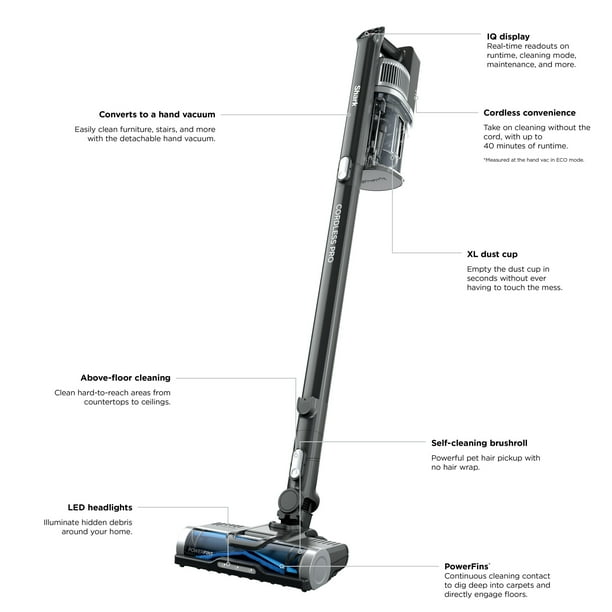
| Problem | Possible Cause(s) | Solution(s) |
|---|---|---|
| Vacuum won’t turn on | Dead battery, loose connection, motor issue | Charge battery, check connections, reset vacuum, inspect motor |
| Weak suction | Blockages, dirty filters, full dust cup | Clear blockages, clean/replace filters, empty dust cup |
| Brush roll not spinning | Hair/debris wrapped around brush roll, belt issue | Clean brush roll, check/replace belt |
| Vacuum turns off after a few seconds | Overheating, blockages, battery issue | Allow to cool down, clear blockages, check battery |
| Unusual noises | Motor issue, loose parts, blockages | Inspect motor, tighten loose parts, clear blockages |
Pro Tips for Maintaining Your Shark Cordless Stick Vacuum
- Regular Cleaning: Clean the brush roll and filters regularly to prevent blockages and maintain optimal performance.
- Proper Storage: Store the vacuum in a cool, dry place to prolong battery life.
- Avoid Overcharging: Don’t leave the vacuum on the charger for extended periods after it’s fully charged.
Alternatives and Variations
- Different Models: Troubleshooting steps may vary slightly depending on your specific Shark cordless stick vacuum model. Always refer to the user manual.
- Professional Repair: If you’re uncomfortable performing repairs yourself, consider taking your vacuum to a professional repair service.
FAQ Section
What does it mean when the Shark vacuum is blinking red?
A blinking red light on your Shark vacuum typically indicates a problem with the brush roll, such as a blockage or motor issue. Turn off the vacuum, remove the brush roll, and clean away any debris. If the problem persists, the motor might need professional attention.
How often should I replace the filters on my Shark vacuum?
It’s generally recommended to replace the filters on your Shark vacuum every 3-6 months, depending on usage. Regular cleaning can extend their lifespan, but replacement is necessary to maintain optimal performance.
Why is my Shark vacuum losing suction power?
Loss of suction power is often due to blockages in the hose, brush roll, or filters. A full dust cup can also reduce suction. Empty the dust cup, clear any blockages, and clean or replace the filters to restore suction power.
Can I use my Shark vacuum without the filters?
No, you should never use your Shark vacuum without the filters. The filters protect the motor from dust and debris. Operating the vacuum without filters can cause significant damage to the motor and void the warranty.
How do I know if my Shark vacuum battery needs replacing?
If your Shark vacuum battery no longer holds a charge, drains quickly, or doesn’t charge at all, it likely needs replacing. Battery life typically decreases over time, especially with frequent use.
Is it worth repairing a Shark vacuum, or should I replace it?
Whether to repair or replace a Shark vacuum depends on the nature and cost of the problem. Minor issues like blockages or filter replacements are easy and inexpensive to fix. However, if the motor is damaged or the battery needs replacement, it might be more cost-effective to buy a new vacuum, especially if your current model is old.
Tips, Warnings, and Best Practices
- Safety First: Always disconnect the vacuum from the power source and remove the battery before performing any maintenance or repairs.
- Avoid Water Damage: Never submerge the vacuum or its parts in water, except for the filters, which should be air-dried completely before reinstallation.
- Regular Maintenance: Consistent maintenance, such as cleaning filters and clearing blockages, can significantly extend the life of your Shark cordless stick vacuum.
Conclusion
Troubleshooting a Shark cordless stick vacuum that isn’t working involves systematically checking potential issues, from the battery and blockages to the filters and motor. By following this guide, you can effectively diagnose and resolve common problems, ensuring your vacuum continues to deliver optimal cleaning performance.
If you’ve tried all the troubleshooting steps and your Shark vacuum still isn’t working, it might be time to consider professional repair or replacement. But with a little patience and effort, you can often get your vacuum back up and running, making cleaning less of a chore. Now that you’re equipped with these tips, go ahead and troubleshoot that vacuum!





